The oven with rotary knob does not start
Resolution
Issue:
- The oven does not start, even though the action on the screen, for example "Refill Water", has been completed
- The oven is not heating
Applies to:
- ovens equipped with display and following rotary knob
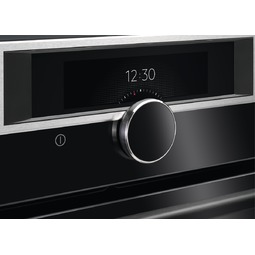
Resolution:
1. All prompts shown on the display, such as "Refill Water", must be confirmed by pressing the rotary knob.
- Hold the rotary knob to turn on the setting screen.
- Hold and turn the rotary knob to navigate through the menu.
- Hold and press the rotary knob to confirm a setting or enter the selected submenu.
- To return to the previous menu find the option "Back" in the menu list or confirm a selected setting.
Was this article helpful?
Related Articles
- How to set a cooker timer (duration) / minute minder
- How to Set the Oven Clock
- Oven displays SAFE or padlock symbol
- Oven light does not work
- How To Remove Oven Shelf Supports For Cleaning
- Oven displays error code (F and number)
- Zanussi Oven and Cooker Functions/Symbols
- Oven displays error message F11 / F111
- Oven clock flashes or time displaying 00:00 / 12:00 - Zanussi
- How to clean the Zanussi oven with pyrolytic function?
Related Articles
- How to set a cooker timer (duration) / minute minder
- How to Set the Oven Clock
- Oven displays SAFE or padlock symbol
- Oven light does not work
- How To Remove Oven Shelf Supports For Cleaning
- Oven displays error code (F and number)
- Zanussi Oven and Cooker Functions/Symbols
- Oven displays error message F11 / F111
- Oven clock flashes or time displaying 00:00 / 12:00 - Zanussi
- How to clean the Zanussi oven with pyrolytic function?